Published 27 October 20265 min read
Why Google can't find you: indexing, sitemaps and robots in plain language
Your site is live but nowhere in search. We explain in plain language how Google discovers and ranks sites, what a sitemap, robots.txt and Search Console are, and how to check it in the Puluno Explorer.
- Indexing
- WordPress
- Explorer
"We have a new website, but when I google our company, nothing shows up." That's one of the most common questions. Usually the problem isn't that the site is "broken" — it runs fine. It's the difference between two things: the site is reachable and Google knows about it and shows it. This article explains, in plain language, how those relate and what to do.
No magic, no "SEO tricks" — just the three steps every site goes through before it appears in results.
How a site gets into Google
Google doesn't memorize the whole internet. It works in three steps:
- 1Crawlingthe bot downloads pages
- 2Indexingfiles them in its register
- 3Rankingdecides where they appear
1. Crawling
Googlebot (an automated program) follows links and downloads pages. If nothing links to the site and it has no sitemap, the bot discovers it slowly — or not at all.
2. Indexing
Google files the downloaded pages in its register — like a giant library catalog. Only an indexed page can appear in results at all. If a page isn't in the index, you won't find it in search, even though the site is live.
3. Ranking
Only from the index does Google decide who shows up higher. That's where content, speed, links and hundreds of other signals matter. But note: until you're in the index (step 2), ranking is beside the point.
Three most common reasons you're invisible
- The site is blocked by mistake. The
robots.txtfile or a "noindex" tag tells Google "don't come here / don't file this". It's often left on from when the site was still being built. - No sitemap. Without a map of pages, the bot only finds URLs through links — slow on a new or large site.
- The site is new and Google hasn't caught up. Indexing isn't instant. On a fresh domain it can take days or weeks for pages to appear.
What a sitemap and robots.txt are
A sitemap (/wp-sitemap.xml) is a list of your site's addresses for search engines — "here are all my pages and products". The bot doesn't have to guess.
robots.txt is the opposite — rules for bots about what they may and may not crawl. It usually points to the sitemap at the end. Trouble starts when someone leaves a line that blocks the whole site.
WordPress with the Puluno SEO module handles the sitemap for you and can add IndexNow (a quick ping to Bing that you have a new page).
What Google Search Console (GSC) is
Google Search Console is a free service from Google for site owners. You add your site as a "property" (a verified domain) and you see:
- which pages Google indexed and which it rejected (and why),
- which queries your site shows up for,
- crawl errors and sitemap status.
You can also request indexing of a specific URL when you publish an important page. The step-by-step guide (including importing the site into Bing from GSC) is in the connections manual.
Old URLs and 404 errors
When you rename a page or delete a product, the original address starts returning a 404 error (page not found). Google keeps visiting it for a while, and visitors from old links hit a wall.
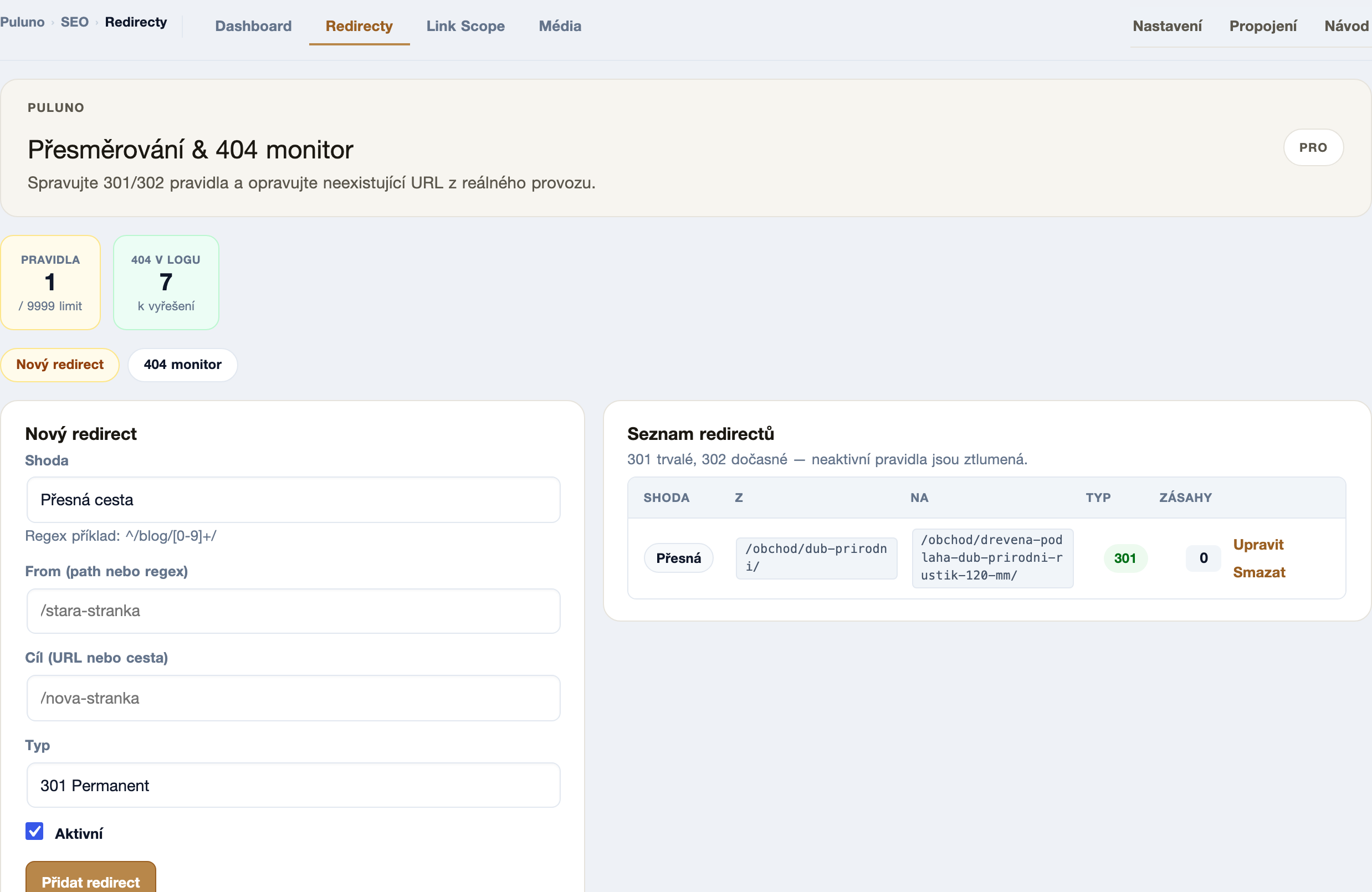
The fix is a redirect: send the old URL to the new one with a 301 (permanent) rule. Puluno SEO has a 404 monitor for this — it shows where people and bots landed, and you redirect it with a single rule.
How to verify in the Explorer
The Explorer checks exactly the things that decide indexing during a scan:
- Open the Explorer and enter
https://your-domain.com. - Wait for the scan to finish.
- On the Overview, check the robots.txt / indexing finding — make sure the site isn't accidentally blocked.
- Look at the sitemap finding — found / missing.
- Fix what you can in WordPress with Puluno SEO and run the scan again.
WordPress: a short checklist
- Puluno SEO → Settings — confirm the sitemap is live (
/wp-sitemap.xml) and the site isn't globally set to "noindex" (in WordPress: Settings → Reading → "Discourage search engines…" must be off). - Connect Google Search Console and submit the sitemap; for Bing, importing from GSC is enough.
- Redirect old URLs from the 404 monitor with a 301 rule.
- Run a scan in the Explorer after changes and watch the findings go down.
Summary: "Can't be found" almost never means the site is broken. First get into the index: don't be blocked in robots.txt, have a sitemap, and connect Search Console. Redirect old addresses with a 301 rule. Measure the state in the Explorer, fix the findings, and scan again — only then does it make sense to worry about who ranks higher.